

Interactive Driving Sound Book Manufacturing Case
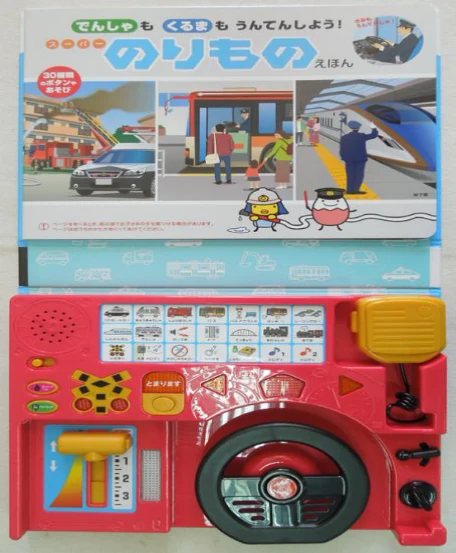
This Japanese-market picture book pairs illustrated vehicle scenes with a working toy dashboard. Children can turn the wheel, move a train-style lever and press vehicle buttons for sounds and lights. The work documented for our factory team covers dashboard and book assembly, product checks and packout.
Production film
Film chapters and summary
- 0:00Finished activity book
The finished book opens to illustrated vehicle scenes above an electronic driving dashboard.
- 0:04Component finishing
The operator locates a steering wheel component in a fixture. At another station, a printed gear selector label is aligned and smoothed into its recess.
- 0:29Dashboard assembly
Operators fasten the electronics assembly and the wheel area, solder individual leads, and bring the front and rear housings together.
- 1:02Dashboard checks
A gloved operator works the wheel and side controls. Indicator lights visibly respond on the unit shown.
- 1:13Book and dashboard
Operators align the printed pages with the cover, prepare adhesive strips on the dashboard and press the book and dashboard together at a fitting station.
- 1:31Page checks and packout
An operator opens the book and turns its pages during inspection. Another prepares the shipping carton and places wrapped books inside.
Finished product and how it works
The book opens above a red dashboard with a black steering wheel, a yellow train lever and a grid of controls. The publisher’s demonstration shows how the panel extends the illustrated vehicle scenes into pretend driving and train play.
- Turning the wheel and using selected dashboard controls triggers sounds or lights.
- The yellow handset is a pretend microphone. It does not amplify the user’s voice.
- The publisher’s catalog identifies the Japanese retail edition first released in 2019.
- Publisher’s product page
Benesse’s original Japanese catalog entry, including the cover and sample pages.
- Publisher’s demonstration on YouTube
The publisher opens the book and operates the dashboard.
- Third-party photos of the finished book
Photos from a Japanese resale listing showing the cover, back and control panel.
Manufacturing and quality evidence
- Fit and fasten the dashboard components, then attach the dashboard to the book.
- Operate the controls at a test station. The inspection instructions also specify sound checks and a retest after fitting.
- Inspect the book and dashboard before final packing.
Check the controls again after fitting
A dashboard that responds before assembly can behave differently once it is attached to the book.
- Production step
- The work instructions call for a button retest after the dashboard is fitted to the book.
- Evidence
- Separate factory footage shows a gloved operator working the wheel and buttons on the finished book. The assembly procedure specifies this second check.
- What buyers can use it for
- For sourcing, agree which inputs must be tested again after final fit, especially when the electronics and paper parts come together late.
Define what a working control should do
A light or sound on its own does not tell you whether the right control triggered the right response.
- Production step
- The inspection instructions call for checking the controls and their expected audio and light responses.
- Evidence
- At 1:02 in the video, the operator works the controls and the indicators respond. The inspection procedure also specifies expected sounds and lights. The footage shows selected checks on the unit at the bench.
- What buyers can use it for
- A buyer can define acceptance as an input-and-response list, so an inspector knows what to observe at the bench.
Inspect both the printed book and the hardware
A working dashboard can still ship with a visible defect on the book or with a part out of place.
- Production step
- The instructions call for examining the book print and appearance, checking the dashboard’s condition and checking how parts sit before packing.
- Evidence
- The book inspection, final appearance and packout procedures describe these checks separately from the functional checks.
- What buyers can use it for
- Agree visual acceptance samples and the pack configuration separately from the electrical function list.
Weigh and log the sealed carton
After cartons are closed, missing or extra contents are harder to spot.
- Production step
- The packout instructions call for weighing the sealed carton and recording the check.
- Evidence
- Separate footage shows an operator placing a sealed carton on a scale and writing on the check sheet. The footage does not establish a weight or acceptance decision.
- What buyers can use it for
- Agree the carton layout, quantity and weight range in advance, and define what to do when a reading falls outside the range.
Planning a similar project?
Share the product format, target market, required functions and launch timing for your educational toy, interactive book or licensed hardware. A short brief is enough to begin.
Frequently asked questions
What did the factory team handle for this project?
The project records document assembly, inspection and packing work for this book and dashboard. Design ownership, component sourcing and acceptance requirements for a new program are agreed in the project brief.
Can we discuss a similar educational toy or IP hardware project?
Yes. Start with the play pattern, target market, age grade, intended release, and the work you need help with. Include which print and electronic parts are already specified, how you want them packed, and which checks matter most.
What should we share when artwork or characters are confidential?
Start with a non-confidential description of the use case, target market and timing. Discuss confidentiality and approved file sharing before sending unreleased artwork, recordings or drawings.